Add EC2 Workers - Spot
We have our EKS Cluster and worker nodes already, but we need some Spot Instances configured as workers. We also need a Node Labeling strategy to identify which instances are Spot and which are on-demand so that we can make more intelligent scheduling decisions. We will use eksctl to launch new worker nodes that will connect to the EKS cluster.
But first, we will add a new label to the OnDemand worker nodes
kubectl label nodes --all 'lifecycle=OnDemand'
Create Spot worker nodes
We are now ready to create new worker nodes.
cat << EoF > ~/environment/eks-workshop-ng-spot.yaml
apiVersion: eksctl.io/v1alpha5
kind: ClusterConfig
metadata:
  name: eksworkshop-eksctl
  region: ${AWS_REGION}
nodeGroups:
  - name: ng-spot
    labels:
      lifecycle: Ec2Spot
    taints:
      spotInstance: true:PreferNoSchedule
    minSize: 2
    maxSize: 5
    instancesDistribution:
      instanceTypes:
        - m5.large
        - m4.large
        - m5d.large
        - m5a.large
        - m5ad.large
        - m5n.large
        - m5dn.large
      onDemandBaseCapacity: 0
      onDemandPercentageAboveBaseCapacity: 0 # all the instances will be Spot Instances
      spotAllocationStrategy: capacity-optimized # launch Spot Instances from the most availably Spot Instance pools
EoF

eksctl create nodegroup -f ~/environment/eks-workshop-ng-spot.yaml
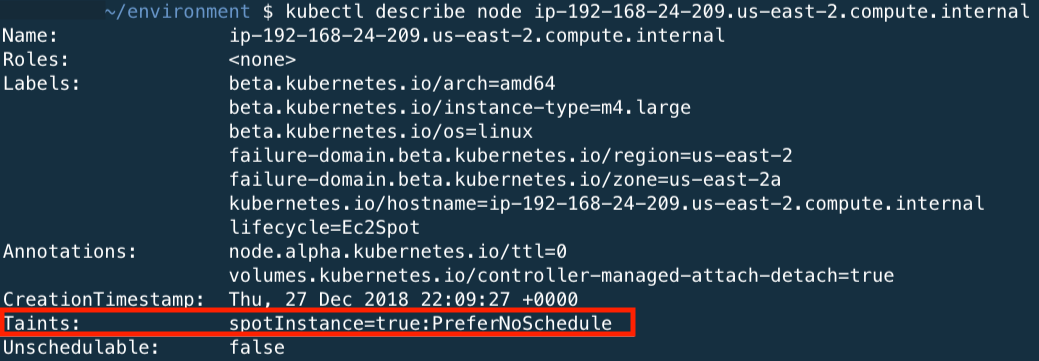
During the creation of the Node Group, we have configured a node-label so that kubernetes knows what type of nodes we have provisioned. We set the lifecycle for the nodes as Ec2Spot. We are also tainting with PreferNoSchedule to prefer pods not be scheduled on Spot Instances. This is a “preference” or “soft” version of NoSchedule – the system will try to avoid placing a pod that does not tolerate the taint on the node, but it is not required.
Also, we specified capacity-optimized as the spotAllocationStrategy, which will launch instances from the Spot Instance pools with the most available capacity (out of the instance types we specified), aiming to decrease the number of Spot interruptions in our cluster (when EC2 needs the capacity back).
The creation of the workers will take about 3 minutes.
Confirm the Nodes
Confirm that the new nodes joined the cluster correctly. You should see 2 more nodes added to the cluster.
kubectl get nodes --sort-by=.metadata.creationTimestamp
 You can use the node-labels to identify the lifecycle of the nodes.
kubectl get nodes --label-columns=lifecycle --selector=lifecycle=Ec2Spot
The output of this command should return 2 nodes. At the end of the node output, you should see the node label lifecycle=Ec2Spot.

Now we will show all nodes with the lifecycle=OnDemand. The output of this command should return multiple nodes as configured in eksctl YAMl template.
kubectl get nodes --label-columns=lifecycle --selector=lifecycle=OnDemand

You can use the kubectl describe nodes with one of the spot nodes to see the taints applied to the EC2 Spot Instances.